
User flows in seconds with Claude Artifacts + FigJam
The use case
You need a user flow. Maybe for a sprint review, a stakeholder meeting, or just to think through a feature. Normally you'd spend 30+ minutes dragging boxes in FigJam or Figma.
With Claude Artifacts, it takes seconds.
How it works
You describe the flow in plain language → Claude generates a Mermaid diagram as an artifact → one click sends it to FigJam as an editable diagram.
That's it.
Real example
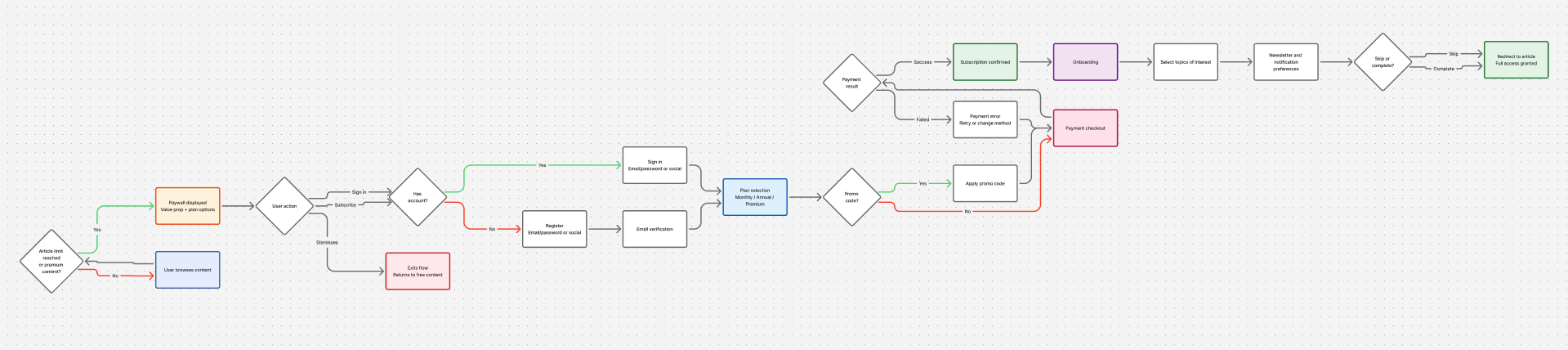
I tried with a free-to-paid conversion flow for a newspaper paywall. Registration, paywall interaction, checkout, onboarding — the full thing.
What I did:
- Told Claude the scope: "free-to-paid conversion for a newspaper subscriber"
- Picked the stages I wanted: paywall, sign-up, payment, onboarding
- Claude generated a Mermaid flowchart with all decision branches
- Asked it to push it to FigJam → done, editable diagram in Figma
Total time: ~2 minutes.
Why this matters for designers
User flows are thinking tools, not deliverables. The faster you can externalize the logic, the sooner you can spot gaps, share with the team, and move on to the actual design work.
The old way: open FigJam → drag rectangles → connect arrows → realize you missed a branch → redo half of it.
The new way: describe it → get it → refine in FigJam where it belongs.
The 90/10 rule applies here too
Claude gets you 90% of the flow structure instantly. The last 10% — styling, layout tweaks, adding your own annotations — you do in FigJam. That's the part where your design brain actually matters.
Tools used
- Claude.ai (Artifacts + Figma MCP integration)
- FigJam